

You know that feeling when you wake up at 8:00 AM, ready to conquer the world, but by 2:14 PM you’re staring at a spreadsheet like it’s written in ancient hieroglyphics?
That’s not laziness. It’s not a lack of discipline. And it’s definitely not because you need a more expensive planner (though we both know that hasn’t stopped you from buying three this year).
It’s your ADHD brain’s battery hitting 5%.
For most people, productivity is about time management. But for ADHD brains? Time is a suggestion — a slippery, confusing suggestion that often ends with us hyperfocusing on a Wikipedia article about the history of the stapler instead of finishing that client proposal.
Energy-based planning for ADHD is the antidote to the “9-to-5” gaslighting we’ve all been subjected to. It’s the third tutorial in our series for ADHD freelancers, and today we’re going deep into ADHD productivity systems that actually move with you, not against you. We’re building a Notion system that doesn’t just list what you should do — but shows you what you can do based on your current energy. Yes, even when you’re in Zombie Mode.
If you’re still working on your business foundation before diving into this automation deep-end, start with Systems Over Streaks: A Beginner’s Notion Guide to ADHD Business Systems first, then come back here.
The Myth of the Steady State (And Why Your Planner is Lying to You)
Most productivity advice is built for people who have a “flat” energy curve. They wake up, they work, they go home. Their brains are like reliable old Toyotas — they just keep chugging along.
Your brain? Your brain is a high-performance sports car with a leaky gas tank and a temperamental ignition.
Some days, you are a god of focus. You can write 5,000 words, redesign a website, and reorganize your entire kitchen before lunch. Other days? You can’t even figure out how to start the dishwasher without needing a three-hour nap to recover from the decision.
Trying to force a high-energy task into a low-energy brain is a recipe for executive dysfunction and the inevitable “I’m a failure” spiral. Instead of fighting the tide, energy-based planning for ADHD means building a system that respects the flow — moving away from rigid time blocks into a world where your tools understand your neurobiology.
Research from ADDitude Magazine and CHADD consistently shows that executive function differences — not laziness — are what drive the energy crashes ADHD brains experience. Understanding that is the first step to building systems that actually hold.
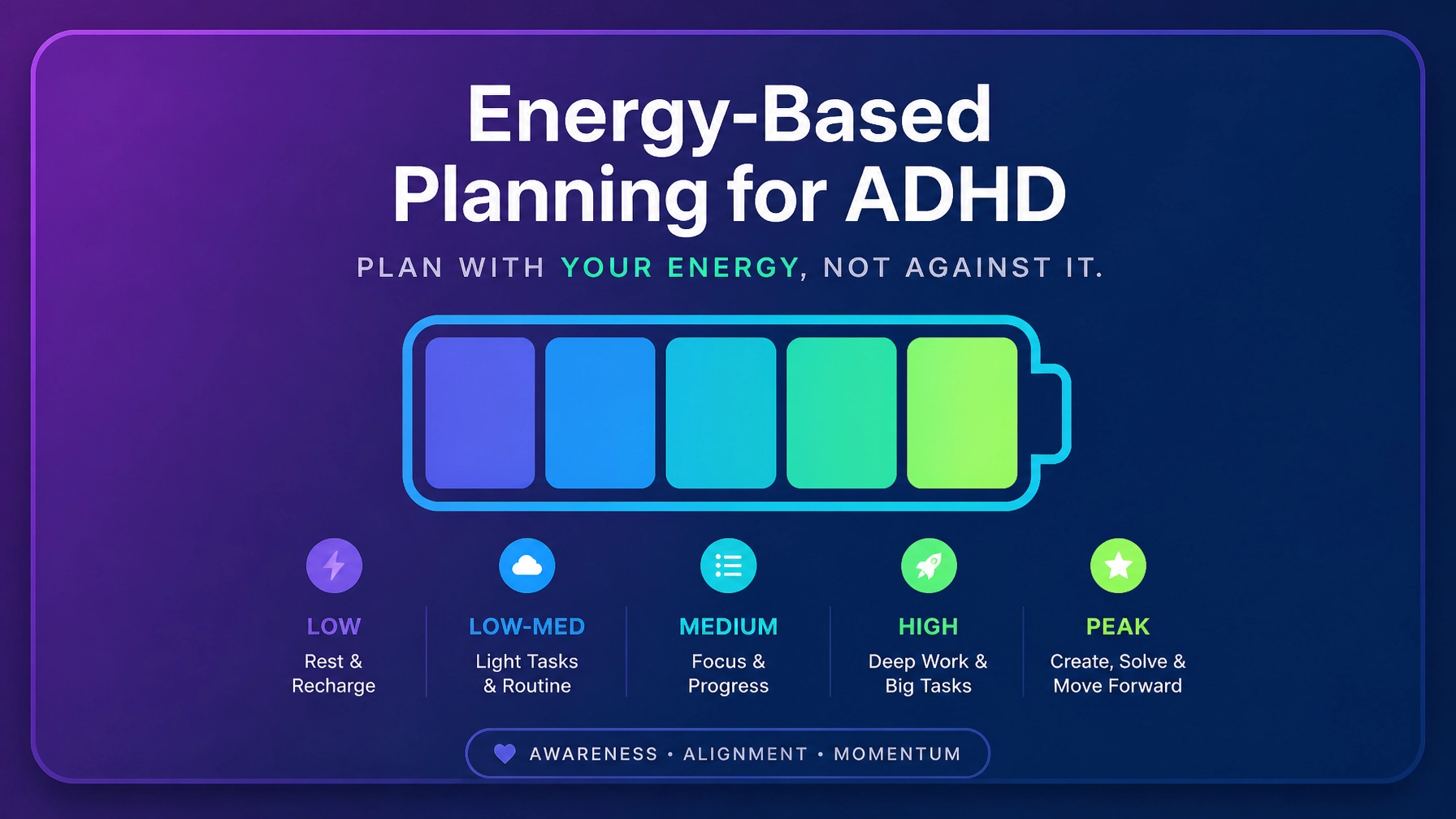
Defining the “Battery Levels” for Energy-Based Planning ADHD Style
Before we touch Notion, we need to define what “energy” actually looks like for you. At PurpleLalu, we break it down into three distinct buckets:
1. High Energy (God Mode / Hyperfocus)
This is when the stars align. You are articulate, fast, and creative. These are your revenue-generating hours.
Tasks: Strategy sessions, deep writing, complex problem-solving, client sales calls.
Brain state: Sharp, “the floor is lava,” get-it-done vibes.
2. Medium Energy (The “Okay” State)
This is your baseline. You’re functional but not necessarily inspired. You can follow a process but might struggle to invent a new one.
Tasks: Emailing, light research, updating your external brain in Notion, basic design tweaks.
Brain state: “I’m here, I’m working, don’t make me think too hard.”
3. Low Energy / Zombie Mode (The Feral Hours)
We’ve all been there. Too many tabs open for too long — mentally and literally. You’re physically present, but your brain has left the building.
Tasks: Filing receipts, clearing the Downloads folder, basic admin, watching a tutorial without taking notes.
Brain state: “I am a potato. Please don’t ask me to choose a font.”
Step-by-Step: Building the “Battery Level” Filter in Notion
Now let’s get tactical. This is the core of energy-based planning for ADHD — a system where you toggle a battery level and watch your to-do list transform to show only what your brain can actually handle right now.
Step 1: The Tasks Database
If you don’t already have a master tasks database, create one. Add a Select Property called Energy Required with these options:
- 4 — High
- 3 — Medium
- 2 — Low
- 1 — Zombie
Step 2: The Control Center
Create a separate, tiny database called Status Center. You only need one row — name it Global Settings. Add a Number Property called Current Brain Battery. Pro tip: use an icon for this. It makes the control feel more like a physical switch, which your brain will actually want to interact with.
Step 3: The Relation & Rollup
Link your Tasks database to your Status Center:
- In your Tasks database, add a Relation Property to the Status Center.
- Relate every task to that one Global Settings row. (Highlight all tasks and bulk-edit the relation.)
- Add a Rollup Property to the Tasks database — Relation: Status Center, Property: Current Brain Battery, Calculate: Original.
Now every task in your database “knows” what your current battery level is.
Step 4: The Magic Formula
Add a Formula Property called Visibility Filter and use this formula:
if(prop("Energy Required") <= prop("Current Brain Battery"), true, false)Translation: if a task requires Level 4 energy but your battery is set to 2, the formula returns false and hides the scary stuff. You only see what your brain can realistically handle right now.
Step 5: The Dashboard Views
On your main dashboard, create three linked views of your Tasks database:
- Available Right Now — filter where Visibility Filter is checked AND Status is not Done.
- The Backlog — filter where Visibility Filter is unchecked.
- Zombie Mode Wins — filter where Energy Required is 1 — Zombie.
If you want a pre-built version of this entire setup without starting from scratch, the ADHD Productivity System ($27) has energy-matched views built in — including a dedicated Zombie Mode view and a Superhero Mode filter — so you skip the build phase entirely.
Automating the Shuffle (When the Energy Dips)
Setting up the filter is half the battle. The other half is what happens when you fail to do a task because your energy plummeted. Usually, those tasks just sit there mocking you with their overdue dates. This triggers executive dysfunction paralysis — where you close the laptop and go play Stardew Valley for six hours. No judgment. It’s a great game.
Instead, use ADHD time management automations to handle the shuffle for you.
The “Bail Out” Automation
In Notion, you can set up Database Automations:
- Trigger: If Status changes to “Overwhelmed” (or whatever you want to call your “I can’t do this” button).
- Action: Change Date to “Tomorrow” AND change Status back to “Not Started.”
This removes the immediate pressure. It tells your brain: it’s okay, we’re not doing this today, and we’re not losing the task. It’s the digital equivalent of a permission slip to be human.
If you’re feeling consistently overwhelmed regardless of what your Notion setup looks like, it might be time to look at the bigger picture. The Finally Focused course deep-dives into the psychology of why we get stuck in these loops — and how to build a sustainable framework that doesn’t rely on willpower to keep functioning.
Managing the Hyperfocus Trap
Hyperfocus is a superpower — but it’s a superpower with a massive cool-down period. If you spend eight hours in Level 4 Energy, you will be at Level 1 for the next two days. This is where your system needs to protect you from yourself.
In our Content Command Center, we use a similar energy-tagging system for content creation. Writing a month’s worth of captions (High Energy) is a very different beast than finding trending audio (Low Energy). If you try to do both at the same time, you’ll burn out.
Use your Battery Filter to cap your High Energy tasks. Rule of thumb: no more than three Level 4 tasks per day. Once they’re checked off, your Available Right Now view should show you Level 2 or 3 tasks to let your brain simmer down.
For more on how to organize your creative output without losing your mind, the post on Body Doubling 101 covers the support structures that keep hyperfocus from becoming a two-day recovery event.
Why Systematic Wins Over Willpower Every Time
We’ve all heard the advice: “Just meditate!” or “Eat a frog first thing in the morning!” Listen — if I eat a frog at 9:00 AM, I’m going to spend the rest of the day thinking about how gross frogs are. I’m not going to get more work done.
The reason ADHD business tools need to be systematic is because willpower is a finite resource. Systems are not. By building a Battery Filter, you remove the decision fatigue of “what should I work on next?” — and decision fatigue is the silent killer of ADHD productivity.
Every time you look at a list of 50 tasks and choose one, you burn precious dopamine. By the time you’ve picked a task, you’re already exhausted. Energy-based planning for ADHD solves this by letting the system choose for you based on your current state — not your best-case scenario self.
If you want to go deeper on why standard productivity systems keep failing you, the post on 10 reasons your productivity system isn’t working is worth reading before you build anything new. And if the chaos feels bigger than just energy management — if the whole business feels like it’s running you — this one picks up exactly where this post leaves off.
The Secret Ingredient: Body Doubling
Sometimes, even with the best Notion setup, your brain still says no. This is where body doubling comes in. It sounds strange to outsiders — sitting on a video call with someone just to work in silence — but for the ADHD brain, it’s like magic. It’s the external accountability that bridges the gap between “I want to do this” and “I am actually doing this.”
Our Body Doubling sessions are the perfect companion to an energy-based system. When you’re in Medium Energy, sometimes having another person present is exactly what you need to bump a task into the Done column. If you want the full breakdown of why it works neurologically, read Body Doubling 101.
Keeping Receipts: How to Audit Your Energy
After a week of using this system, look back at your tasks. Did you constantly label things as High Energy that actually took Medium Energy? Are you spending 90% of your time in Zombie Mode?
If you’re stuck in a permanent state of Low Energy, that’s usually a sign of burnout — not ADHD. Burnout cannot be automated away. It requires a hard reset. If you feel like you’re hitting a wall and no amount of Notion filters is helping, the Notion Automations 101 guide is designed to help you strip away the fluff and find a sustainable way to run your business that doesn’t end with you crying over a task board.
For further reading on the neuroscience behind why your brain does this — and why you aren’t just lazy — ADDitude Magazine and CHADD are the most reliable resources out there. Thomas Frank’s Notion Formula Guide is also worth bookmarking if you want to get nerdy with your Battery Filter formulas.
Final Word: Doing Over Feeling Ready
The biggest trap ADHD freelancers fall into is “procrastivity” — doing productive-looking things (like building a Notion battery filter) to avoid doing the actual work. Don’t spend three days making this look pretty.
Get the basic filter working. Tag three tasks. Set your battery to whatever you feel right now. Then do one thing. Just one. The goal of energy-based planning for ADHD isn’t to make you a robot. It’s to make you a freelancer who doesn’t hate themselves by 5:00 PM.
Go set your battery. I’ll see you in the Done column.
Want the system without the build?
The tools that pair with everything in this post:
- Pre-built energy views + Zombie Mode filter: ADHD Productivity System ($27)
- Organize your content by energy level: Content Command Center ($17)
- External accountability when the system isn’t enough: Body Doubling sessions (from $15)
- The full framework for sustainable ADHD systems: Finally Focused course ($67)
Stop fighting your brain. Start working with it.
